FAQ Shortcode Documentation
FAQ Manager With Structured Data plugin adds a wpt_faqs shortcode. The shortcode lists FAQs.
The shortcode provides attributes that helps to filter and style the FAQ items.
It provides 3 pre-built style presets (2 of them are premium). It also provides 5 icon sets (4 of them are premium)
Pre-requisites
- A WordPress website
- FAQ Manager With Structured Data plugin
Tools
- Computer
- Text Editor
Total Duration : 5 minutes
Start your FREE trial. No credit cards required.
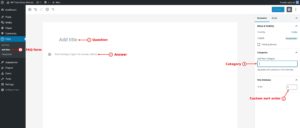
Add FAQ data in WordPress admin
-
Add, categorize and order the faq items in your WordPress admin. For details follow this guide
Start your FREE trial. No credit cards required.
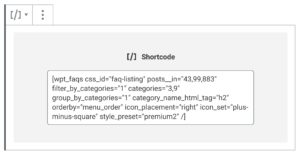
Shortcode attributes
-
css_id :
idattributes value for the main wrapper. Default is wpt-faqs -
css_classes:
classattributes values for the main wrapper. Class wpt-faq-accordion gets appended to these values. Default is empty string. -
post__in : Comma separated ID'of the FAQ items. Shortcode displays these FAQs. Premium feature
-
post__not_in : Comma separated ID'of the FAQ items. Shortcode excludes these FAQs. Premium feature
-
filter_by_categories : Enable/disable filtering by categories.
1means enable and0means disable. Default is0. Premium feature -
categories : Comma-separated FAQ category IDs. Shortcode fetches FAQs belonging to these categories. Default is empty string. Premium feature
-
category_name_html_tag. HTML tag name for the category name. Default is h3. Premium feature
-
faqs_per_page : Number of FAQs to fetch per query. Integer value. Default -1 fetches all.
-
group_by_categories :
1groups FAQs by categories while0shows all the FAQs ungrouped. Default is0. Premium feature -
orderby : Orders the FAQs by given field. Default is date. Refer to this documentation for details.
-
order : Designates the ascending (ASC) or descending (DESC) order of the ‘orderby‘ parameter. Default is ASC
-
expand : A value of
1expands all FAQs initially. A value of0restricts the FAQ list to expand one FAQ item at a time. -
can_open : Available values are
oneandmany. Defines how many FAQs can be open at a given time.- A value of
onerestricts the FAQ list to open one FAQ at a time. A value ofmanyallows to open as many FAQs. - When expand is set to
1, can_open value is set to many
- A value of
-
icon_placement : Defines the icon placement. Default is left
nonehides the icon.leftaligns the icon to the left.rightaligns the icon to the right.
-
icon_set : Defines the icon set to use. Default is plus-minus. Available sets are:
- plus-minus
- single-chevron (premium)
- double-chevron (premium)
- plus-minus-circle (premium)
- plus-minus-square (premium)
-
icon_color_open - Color of the icon when FAQ is open. Default is #4c8bf5
-
icon_color_close - Color of the icon when FAQ is close. Default is #4c8bf5
-
question_text_color_close : Color of the question text when FAQ is close. Default is #2f3b48
-
question_text_color_close : Color of the question text when FAQ is close. Default is #2f3b48
-
style_preset: Pre-built style presets for the FAQ listing. Default value is default. Available presets
defaultpremium1(premium)premium2(premium)
Start your FREE trial. No credit cards required.